


Antigravity
Antigravity A1 8K 360 Drone – Remote Controller Bundle with Vision Goggles
The Antigravity A1 Remote Controller Bundle pairs the A1 8K 360 drone, co-engineered with Insta360, with a classic dual-stick Remote Controller and the Vision Goggles. It is built for experienced pilots and creators who want precise manual flight and pro-level camera movement, while still enjoying immersive 360 first-person views. Three High-Capacity Flight Batteries and a Charging Hub are included for long flying sessions.
Key Features
- Classic dual-stick Remote Controller for precise manual flight
- Vision Goggles for immersive 360 flight – turn your head to look around
- Fixed View for precise camera work, Free View for immersive flying
- 8K 360 capture – reframe any shot after the flight
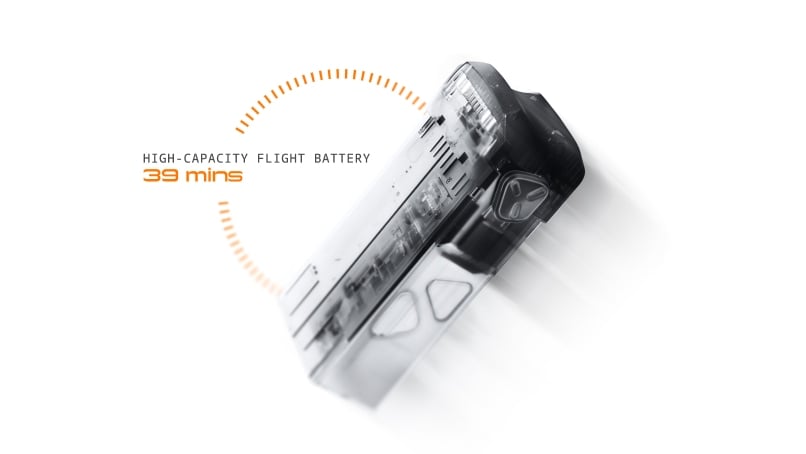
- Up to 39 minutes of flight time with the High-Capacity Flight Battery [2]
- 3 High-Capacity Flight Batteries, Charging Hub and Quick Reader included
Classic Dual-Stick Design
Responsive dual-stick controls give you full, direct command of every movement A1 makes.
Precision Control for Pro Shots
Fly cinematic moves by hand: chase the action, sweep around a subject or thread through a canyon with smooth, precise inputs.
Immersive 360 Flight
Put on the Vision Goggles and simply turn your head to look around the sky in every direction.
Two Views, Two Ways to Explore
Switch to Fixed View for precise camera moves and control, or Free View for a fully immersive flight.
One Flight, Every Perspective
Each flight is captured in 8K 360, so you are never locked into one frame – choose the best angle afterwards, in post.
Discover New Horizons
Stay in the air longer with up to 39 minutes of flight time [2].
Travel and Sightseeing
Weighing in the 249 g class, A1 is an easy travel companion for capturing every trip without limits.
249 g
Light and foldable, A1 slips easily into a travel bag [1].
Immersive 360 Flight
Slip on the Vision Goggles and take your sightseeing into the sky, flying over the scenery like a bird.
8K 360 Video
Record every destination and landmark in 8K 360, then reframe your trip freely once you are home.
Key Specifications – A1 Drone
- Takeoff weight: 249 g (with Flight Battery) / 291 g (with High-Capacity Flight Battery) [1]
- Dimensions: folded 141.3 × 96.2 × 81.4 mm; unfolded (propellers extended) 308.6 × 382.3 × 89.2 mm
- Class: EU C0 (with standard Flight Battery) / EU C1 (with High-Capacity Battery)
- Max flight time: 24 min (Flight Battery) / 39 min (High-Capacity Flight Battery) [2]
- Max flight distance per charge: 13 km (Flight Battery) / 23 km (High-Capacity Flight Battery) [2]
- Max horizontal speed: 16 m/s (S Mode), 12 m/s (N Mode), 3 m/s (C Mode)
- Max ascent / descent speed: 8 m/s (S), 6 m/s (N), 3 m/s (C)
- Max wind resistance: 10.7 m/s (Level 5)
- Max takeoff altitude: 4,000 m (Flight Battery) / 3,000 m (High-Capacity Flight Battery)
- GNSS: GPS + Galileo + Beidou
- Operating temperature: -10°C to 40°C
- Camera: 1/1.28-inch sensor, f/2.2, ISO 100–6400
- Video: 8K 7680×3840@30/25/24fps; 5.2K 5248×2624@60/50/30/25/24fps; 4K 3840×1920@100fps; 4K slow motion 3840×1920@30/25/24fps
- Photo: 55 MP (10496×5248) / 14 MP (5248×2624); Standard, HDR, Burst, AEB; INSP and DNG
- Max video bitrate: 170 Mbps; H.264 / H.265; INSV (exported via Antigravity App or Antigravity Studio)
- Sensing: forward and downward vision sensors plus bottom infrared sensors; omnidirectional obstacle avoidance in 360 mode [3]
- Video transmission: OmniLink 360, 2K@30fps live view, approx. 150 ms average latency; up to 10 km (FCC) / 8 km (SRRC) / 6 km (CE) / 4 km (MIC), open and interference-free [4]
- Internal storage: 20GB; microSD up to 1TB (SDXC, UHS-I, V30 or above, exFAT)
Key Specifications – Vision Goggles
- Weight: 340.4 g (spacer, mask and band included)
- Screens: 1.03-inch Micro-OLED per eye, 2560×2560, 72Hz, TÜV Rheinland Low Blue Light certified; pancake optics
- FOV: DFOV 90°, HFOV/VFOV 65°
- Interpupillary distance: 59–72 mm; diopter adjustment -5.0 D to +2.0 D (to -8.0 D with optional -3.0 D corrective lenses)
- Real View: DFOV 115°, 1088×1088, 50fps
- Screen recording: MP4, 1600×1600, 30fps; internal storage approx. 30GB, microSD up to 1TB
- Goggles battery: 4,500 mAh, 32.85 Wh, approx. 2.5 hours runtime
- Operating temperature: -10°C to 40°C
Key Specifications – Batteries and Charging
- High-Capacity Flight Battery: 4345 mAh, 31.1 Wh, 7.16 V, Li-ion 2S, under 108.6 g
- Charging time: approx. 60 min in the Charging Hub / approx. 103 min in the drone (at 25°C)
- Charging Hub: charges up to three batteries, lowest-charged first; 30 W PD 3.0 output; 118.5 g
- Recommended charger: Antigravity 65W GaN Fast Charger (65 W or higher adapter recommended)
In the Box
- A1 Drone × 1
- Vision Goggles × 1
- Remote Controller × 1
- High-Capacity Flight Battery × 3
- Quick Reader × 1
- Charging Hub × 1
- A1 Drone Carry Case × 1
- Sling Bag × 1
- Spare Propellers × 8
Good to Know
- Remote Controller or Grip Motion Controller? Choose the Remote Controller for classic dual-stick precision and fine manual control, or if you already fly traditional drones. The Grip Motion Controller offers one-handed point-to-fly steering with almost no learning curve.
- Already own an A1? You don't need this full bundle – the Remote Controller is also sold on its own.
- Charging: batteries can be charged inside the drone or in the Charging Hub.
- Travel: the drone can go in carry-on or checked luggage (remove the battery if checked). Batteries must travel in carry-on luggage only; check your airline's Wh and quantity limits.
- Registration rules vary by region and by bundle, because takeoff weight differs. Check your local drone regulations before flying.
Notes
- [1] With the High-Capacity Flight Battery installed, A1's takeoff weight exceeds 249 g and registration may be required. Weight may vary slightly between batches and with environmental factors.
- [2] Tested in a controlled windless environment at 25°C (77°F), 5.2K 30fps with video recording disabled, flying forward at 6 m/s (flight time) or 12 m/s (flight distance) below 50 m altitude until low-battery auto-landing. Results vary with conditions.
- [3] Obstacle avoidance is set to Brake by default. Bypass can be enabled in Safety Settings but reverts to Brake when the drone restarts. Performance depends on lighting, weather and obstacle shape; use in well-lit environments. In single-lens mode only forward obstacle avoidance is available; omnidirectional avoidance works in 360 mode.
- [4] Max transmission distance was tested outdoors at 25°C in an open, interference-free environment, one-way, without return-to-home. Actual range varies with environment, usage and firmware. 5.1 GHz and 5.8 GHz bands are only available where permitted by local regulations.
• Please read the following shipping instructions carefully. Product that arrives damaged in shipment, without an RMA number or without appropriate warranty information, will be, returned to the sender non-repaired. Products, damaged through neglect due to improper packaging or in shipment, will have the warranty voided and will be processed and returned to you non-repaired. Note: An example of improper packaging would be sending a product back in an envelope.
• Only products and quantities authorized through the Return Material Authorization process will be accepted. If your RMA packing list is in error, ie. Wrong product description, wrong model number, wrong capacity please contact DronePoint Customer Support prior to shipment.
• All products require stable and sufficient packing material, needed to protect the product from ESD (Electro Static Discharge) influences and possible damage during transport. Required Packaging Steps:
A. Place item in ESD (Electro Static Discharge) Bag (For electronics only.)
B. Wrap with 2 inches of bubble wrap or non-movable foam cushioning
C. Place in sturdy cardboard box. Do not use chipboard, as it is not strong enough to withstand the rigors of transit. Please make sure the corrugated carton is free from defects and is structurally sound. Note: Returning an item in an envelope, will void the warranty.
D. Please write the Return Material Authorization number on outside packaging, on three sides in bold print.
E. When shipping multiple items, each item must be, packed as above, items must not directly touch each other and cannot move inside the packaging. All products must be, packed in individual anti-static bags and in a sturdy cardboard box. Please utilize original packaging when available. DO NOT USE peanuts or packing material that can shift or settle during transit. Warning: Returning an item in an envelope, will void the warranty.
• Send your product to the address located on our Page. Retain a record of your RMA number and all tracking/shipping numbers for your records. This will allow DronePoint to better serve you with possible inquiries.
• Your Return Material Authorization number must be visible on 3 sides of the box. Any package sent in without an RMA number will be returned to you non-repaired.
• Use a traceable carrier. Use a traceable carrier for transport or a signed for service (i.e., Airborne, Fed Ex, UPS, XpressPost, etc.) with the post office (Canadian customers only) as they provide you with a tracking number and proof of delivery. The cost of sending an item to our service center for warranty service, is paid by the customer. DronePoint pays for the return shipment. If upon arrival your products are out of warranty the shipment will be returned to you at YOUR COST.

Subscribe to our newsletter
Promotions, new products and sales. Directly to your inbox.